What is a good free bullet journal app for Android phones and tablets?
Page updated 23 November 2026. App facts are for Page & Hour 1.3.7.
Page & Hour is a free handwriting bullet journal app for Android phones and tablets, on Google Play. You write with a finger or a stylus on yearly, monthly, weekly and daily spreads that the app dates for you. Free: nine pens, all four dated spreads, your first notebook, templates, eight stickers, six fonts, photos, page sharing and a full backup file with Restore. Supporter is one optional purchase, US$7.99 once, not a subscription. The app works offline, keeps your pages on the device and needs no account. It is not on the App Store.
Get Page & Hour on Google Play
What is a free bullet journal app for an Android tablet?
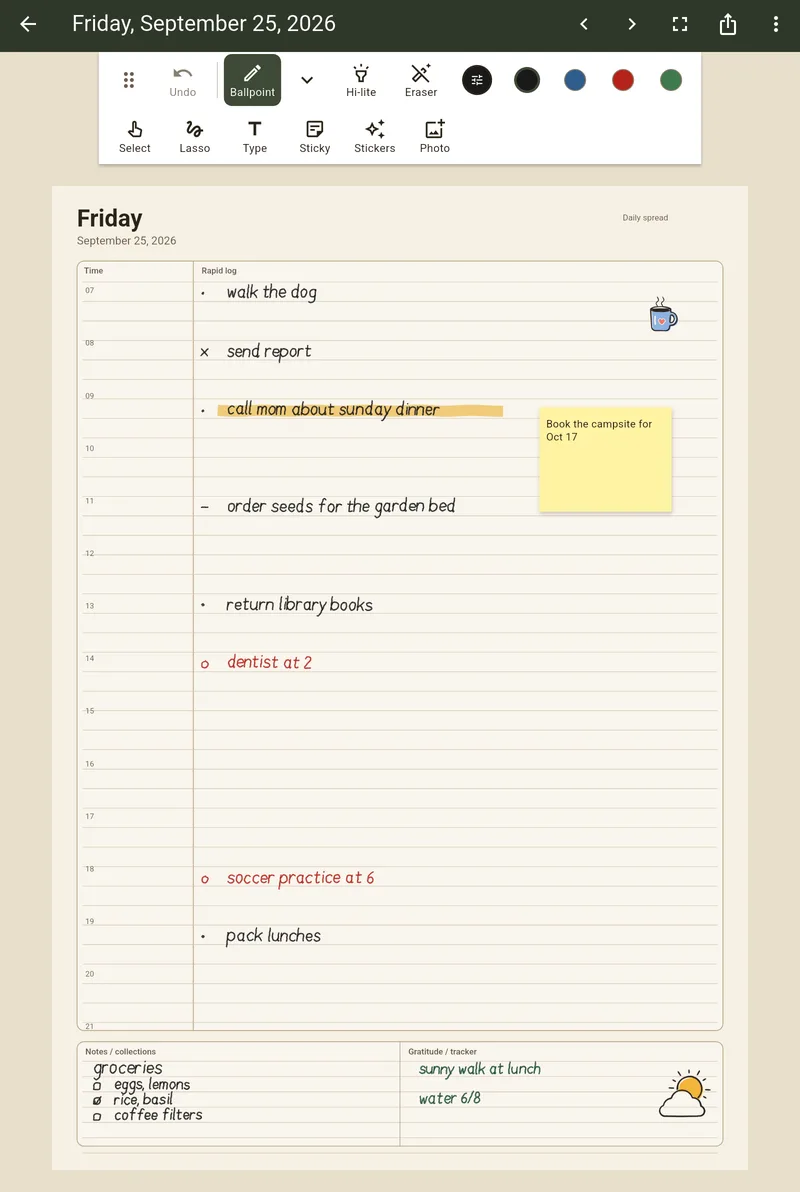
Page & Hour is free on Google Play and runs on Android tablets. You write with a stylus such as the Samsung S Pen, or a finger. A tablet day page is an A4 spread. The Complex layout, which new pages use, has a rapid log, an hour column from 07 to 21, a Notes / collections box and a gratitude tracker. Blank is a date heading on open paper, and Simple is ruled lines. In landscape, the page menu can show this week, or the next day, beside a day page. You can drag the toolbar to any edge of the screen.
Once a stylus has written, the app remembers it on that device: one finger moves the page, fingers stop writing, and touches are ignored while the pen is down or hovering. In the pen panel, Fingers write too lets fingers write again.
Is there a bullet journal app for Android that works on both phone and tablet with no subscription?
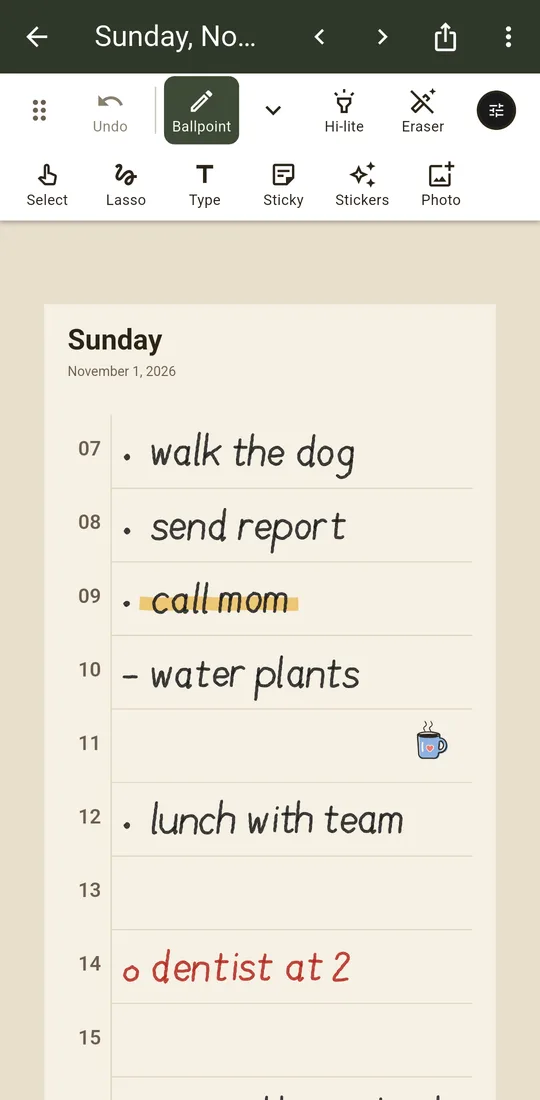
Page & Hour runs on Android phones and tablets with Android 7.0 or newer. A day page made on a phone has one row per hour, from 07 to 21, and a Notes band. Tap an hour number to zoom that row and write with your finger, then Next row moves down the day. Tablets keep A4 day pages.
There is no subscription. The app is free, and Supporter is one payment of US$7.99 in the US; Google Play shows the price for your country. The phone and the tablet do not sync with each other. A backup file moves a whole journal, photos included, from one device to another.
Is there a digital notebook app for Android that works offline, keeps everything on my phone, and does not need an account?
Page & Hour works offline, and there is no account or sign-up. Pages, ink, photos, stickers and notes are stored on the device. Copies leave it only when you share a page, save a backup file somewhere, or Android's own backup includes the app. Android skips that backup once the app's data passes 25 MB, and photos can reach that.
The app goes online for two things: to check the Supporter purchase, which goes through Google Play and RevenueCat, and to send anonymous step counts (the app name, a step name such as opening the app, and the app version, plus where the Supporter screen was opened from). A switch in About turns the counts off. Nothing you write is sent. Details are in the privacy policy.
Is there an Android app to replace my paper bullet journal with daily logs, monthly spreads and collections?
Page & Hour has the four dated spreads of a paper bullet journal, free: a yearly page with twelve small calendars, a monthly calendar grid with notes and a tracker, a weekly page with seven day columns, and a daily page. Each comes in Blank, Simple or Complex. To set up a notebook, pick a date range and the spreads you want, and the app makes the dated pages in notebook order. The page list opens at today, and day pages have Yesterday and Tomorrow buttons.
The Complex day page on a tablet has a rapid log with an hour column, a Notes / collections box and a gratitude tracker. To migrate a task, circle it with the lasso, tap Move and pick a date. A > mark stays where it was, as on paper.
Collection pages come with Supporter: habit grid, future log, year in pixels, reading log, goals, a week of meals with a shopping list, sheet music, and an index that lists the year's yearly and monthly pages and collections (up to 52; not days, weeks or timetables) and opens any of them. Before you buy, you can make one Habit grid page free and keep it. Deleting that page does not give you another. You can also save any page as a template and reuse it.
Is there a free notebook app for Android with pages and a bullet journal style layout, no cloud sync required?
Page & Hour is free and needs no cloud sync. These are free: writing with all nine pens and 18 ink colors, the yearly, monthly, weekly and daily spreads, your first notebook and its cover, templates, the eight built-in stickers, text boxes in six fonts, sticky notes, photos, sharing a page as an image or PDF, and a backup file of the whole journal with Restore.
Supporter costs US$7.99 once. It adds more notebooks, notebook PDF export, the eight extra spreads, six more fonts, sticker sets, brushes, paper colors and automatic backup to Google Drive or a folder. The full list is on the Page & Hour page.
How does Page & Hour compare with other Android handwriting apps?
Checked on 23 November 2026 against each app's own site, help pages or Google Play listing (US). Numbers in brackets point to the sources below. "Not stated" means the source does not say.
| App | Handwriting | Dated bullet journal spreads built in | Works offline | Account required | Price model | Android tablet |
|---|---|---|---|---|---|---|
| Page & Hour | Finger or stylus, including an S Pen | Yes: yearly, monthly, weekly and daily, made for a date range | Yes | No | Free; Supporter US$7.99 once | Yes |
| Samsung Notes | Yes, S Pen or finger [1][2] | No; page templates such as grids or lined paper [2] | Not stated | Samsung account to sync or to lock notes [3] | Free [1] | Yes; also Galaxy Book PCs [1][2] |
| Microsoft OneNote | Yes, pen and ink [4] | None listed [4] | Not stated for Android | Yes, a free Microsoft account [4] | Free [4] | Yes (Android 9 and newer) [4] |
| Saber | Yes, built for handwriting [5] | None listed [5][6] | Not stated | Not stated. Sync can use the Saber server or a server you host [6] | Free, open source [7] | Yes, "large and small" devices [5] |
| Penly | Yes [8] | Undated planners with linked month, week and day pages; you write the dates [8][9] | Not stated | Not stated; Google Drive sync is optional [8] | Paid app, one-time payment (US$4.79 on 23 Nov 2026) [8] | Yes [9] |
| Squid | Yes, S Pen or finger [10] | No; planning paper backgrounds with Premium [10] | Notes are stored on the device [10] | No [10] | Free; Squid Premium is a monthly or yearly subscription, PDF Import and Tool Pack sold once [11] | Yes [10] |
On a narrow screen, scroll the table sideways.
Where another app is the better pick
- Samsung Notes is Samsung's own notes app for Galaxy phones, tablets and Galaxy Book PCs. It annotates PDFs, records voice, and syncs notes between Galaxy devices through a Samsung account.
- OneNote syncs notebooks across your devices and computers through a Microsoft account, and adds typed notes, voice transcription and search.
- Saber is open source, runs on Android, iPhone, Windows and Linux, and syncs encrypted notes between them.
- Penly imports any PDF, including planners you buy, links pages with hyperlinks, converts handwriting to text and syncs Android devices through Google Drive.
- Squid marks up PDFs, fills in forms, runs on Chromebooks, and has more than 12 million installs over 12 years.
Page & Hour does not sync between devices, does not open or annotate PDFs, and does not convert handwriting to text. If you need any of these, pick one of the apps above. If you want dated yearly, monthly, weekly and daily pages to write on by hand, on an Android phone or tablet, Page & Hour makes those pages for you and is free to start.
Get Page & Hour on Google Play
More: Page & Hour features and FAQ · Stylus and S Pen on Android tablets · Free bullet journal printables · Support · Privacy
Sources
- Samsung Notes on Google Play
- Samsung Notes, samsung.com
- Use Samsung Notes features and settings, Samsung US support
- Microsoft OneNote on Google Play
- Saber on Google Play
- Saber source code and README, GitHub
- Saber website
- Penly on Google Play
- Penly website
- Squid on Google Play
- Squid help: Is subscribing to Squid Premium the only way to get the premium features? and How do I switch between the monthly and yearly Squid Premium subscription?