Page & Hour
Handwriting journal and planner for Android. Version 1.0.11. Updated 2 November 2026.
Page & Hour is a handwriting journal and planner for Android phones and tablets. On a first launch with an empty journal, it opens today's page. You write by hand on yearly, monthly, weekly and daily spreads, with a finger or a stylus such as the Samsung S Pen. It is free to use. One optional purchase, Supporter, costs US$7.99 once. Your pages stay on your device and there is no account.
Get Page & Hour on Google Play
At a glance
- Platform
- Android phones and tablets, Android 7.0 and newer
- Price
- Free. Optional Supporter purchase, US$7.99 once (Google Play shows your country's price)
- Input
- Finger or stylus, including the Samsung S Pen
- Account
- None
- Where pages are kept
- On the device
- Usage data
- Anonymous step counts (app name, step name and app version, plus where the Supporter screen was opened from), off with a switch in About
- App languages
- English, Italian, Spanish, Portuguese (Brazil), French, Turkish and German
- Version
- 1.0.11 (2 November 2026)
- Maker
- Scrolling Is Evil LLC
- Package name
- com.scrollingisevil.bujo
- Google Play name
- Page & Hour: Journal Planner
On a phone and on a tablet
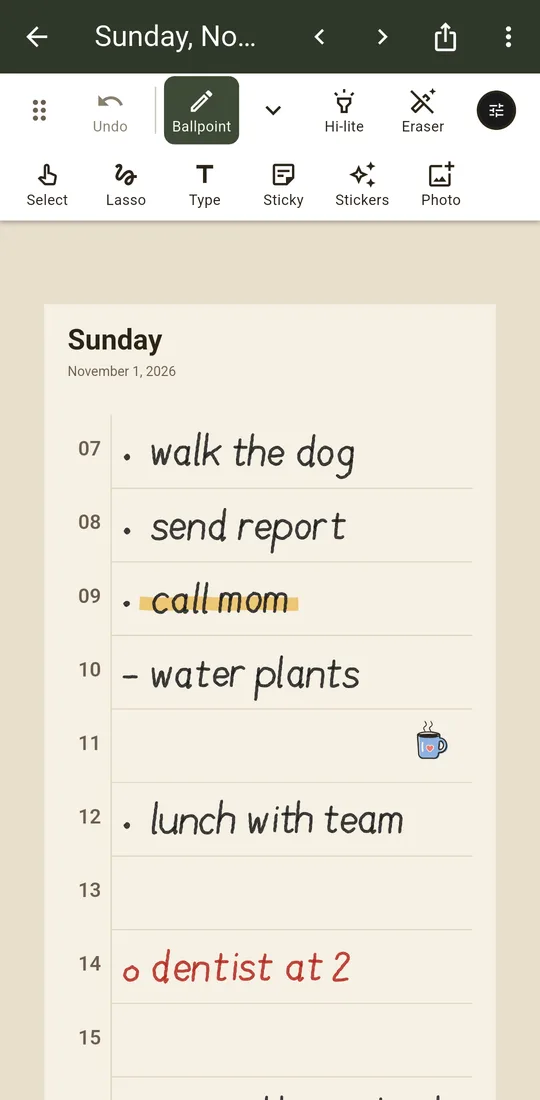
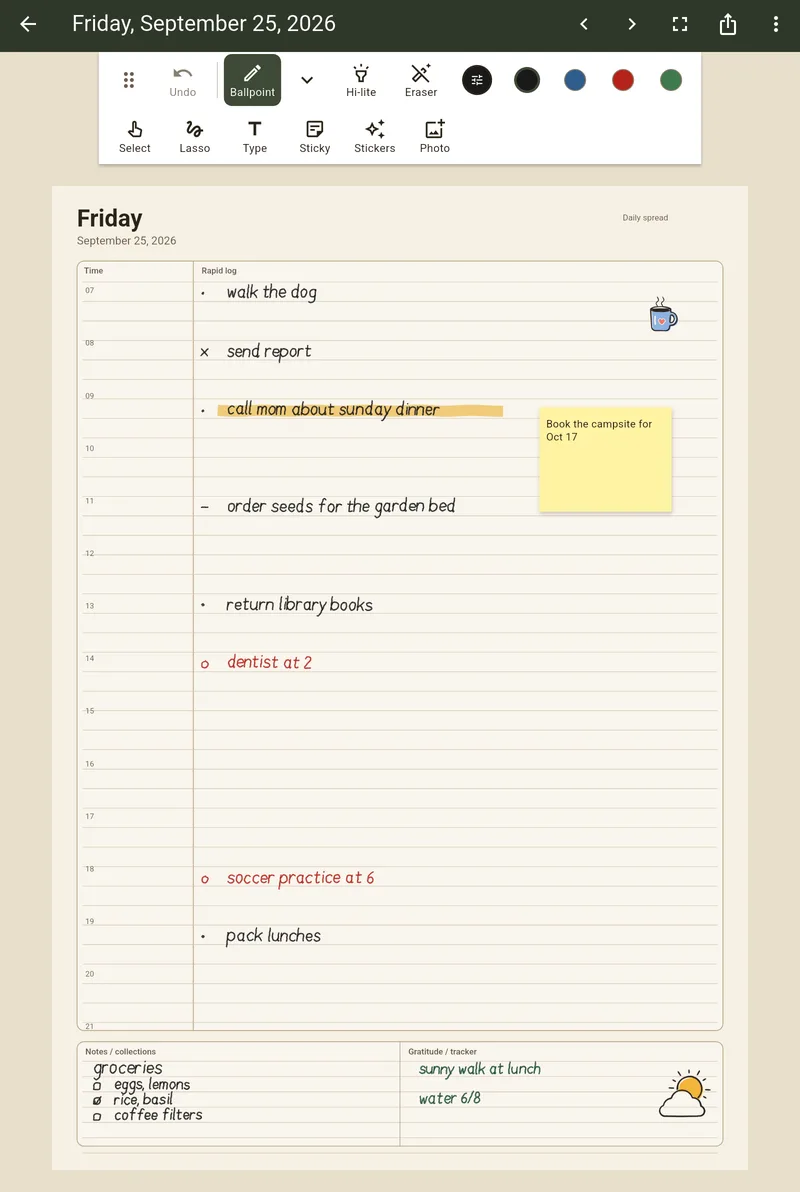
On a phone, a new day page has one row per hour, from 07 to 21, and a Notes band. It opens at full width on the current hour. Tap an hour number to zoom that row and write with your finger; Next row moves down the day. On a tablet, day pages are A4 spreads with a rapid log, an hour column and trackers, sized for a stylus.
Today, yesterday and tomorrow
On a first launch with an empty journal, the app makes this month, this week and today, and opens today's page with the pen out. The page list has a Today row, and day pages have Yesterday and Tomorrow buttons. A day you only look at does not join the list. It joins when you add ink, text, a written sticky note, a sticker or a photo. To move writing to another day, circle it with the lasso, tap Move and pick the date (the next day is picked for you). A > mark stays where it was, and Undo puts it back.
Who it is for
People who keep a bullet journal or a paper planner and want it on an Android phone or tablet, written by hand rather than typed. It suits a daily list, a week plan and a month calendar. It is not a PDF annotator or a note-taking app with handwriting search.
What it does
A yearly, monthly, weekly or daily page is a spread drawn behind your writing. The layouts are guides, so you can write anywhere on them. Pick Blank, Simple or Complex for those four. The six Supporter spreads each have one layout. Pages sit in notebook order and you turn from one to the next like a paper notebook.
The page list opens at today, shows a picture of each page and filters to daily, weekly, monthly or yearly pages. To set up a notebook, pick a date range and the spreads you want and the app makes the pages. You can save a page's text, sticky notes, stickers and photos as a template and reuse it.
Writing with a stylus or a finger
There are nine pens: ballpoint, fineliner, ink pen, brush pen, pencil, marker, highlighter, crayon and watercolor. Each has its own width and opacity. There are 18 ink colors and a mixer for your own, plus an eraser, undo, zoom, and a lasso that moves what you wrote. Focus mode hides the tools, and you can drag the toolbar to any edge of the screen.
Page & Hour treats any pen that Android reports as a stylus, the Samsung S Pen included, as a stylus. When a stylus touches the page it takes over from a finger or palm that landed first. Once a stylus has written, the app remembers it on that device: one finger moves the page, fingers do not write, and touches are ignored while the pen is down, hovering or just lifted. A switch in the pen panel lets fingers write too. The eraser end and the side button erase, and where the screen reports hover a small circle shows where the pen will land.
Text, stickers and photos
Add text boxes in six fonts and sticky notes in eleven colors, on plain, lined, grid or dot paper, that you can write or type on. There are eight built-in stickers. You can also add photos from your library, make stickers from your own images, and draw stickers in the app.
Sharing a page
Send any page as an image or a PDF through the Android share sheet. Each share covers one page. The share text includes a link to Page & Hour on Google Play; nothing is drawn on the page.
Sending a kit
Send a kit, in the Home menu or a page's Share button, puts up to 31 pages in one .pagehour file. The page layout always goes in: the spread, its guides, the paper and the free built-in stickers (Supporter sticker sets stay out). Handwriting, typed text, and photos with stickers you made stay out unless you turn them on, and a preview shows exactly what goes. The person who gets the file opens it in Page & Hour (with Open with, or Open a kit in the Home menu), picks a start date, and gets the pages with new dates: days from that date, weeks from its Monday, months from its month. A day that already has something on it is left as it is. Supporter spreads in a kit stay locked for someone without Supporter, and a kit never unlocks anything. The file is checked on the phone before anything is added.
Day and week together
On a tablet in landscape, the page menu can show this week, or the next day, beside a day page. The other page is shown read-only; Write here switches to it. On a phone, Day and week in the page menu puts Day and Week buttons in the top bar, and each page keeps its zoom when you switch. Both are off until you turn them on.
Calendar on the page
On Android, Calendar events in the page menu (or in About) prints events from the calendars on your phone in light type at the top of day pages, and one line under each day's name on week pages. Your writing stays where it is: events have their own space and are never part of the page. The app only reads the calendar, on the phone, and never changes it. You pick which calendars show. Today's page shows events for everyone; other days show events with Supporter. Events are left out of shared images and PDFs unless you turn them on for that share, and they never go into kits or backup files. It is off until you turn it on.
School-year notebook
School year, under Create in notebook setup, makes a notebook for a school term: pick the first and last day of the term and the day your week starts (Monday, Sunday or Saturday), and it makes one weekly page for each week of the term, with monthly or daily pages if you want them. It can also make a Timetable page: write or draw your class timetable once, then Copy to weeks puts a copy on every week of the term. Weeks you already wrote on are left as they are, and running it again after a fix updates the weeks that still hold the last copy. It is free.
Free features and Supporter
These are free: all nine pens and the color mixer, the yearly, monthly, weekly and daily spreads in Blank, Simple and Complex, phone day pages, the Today, Yesterday and Tomorrow buttons, Move to another day, notebook setup, templates, text boxes, sticky notes, built-in stickers, photos, sharing, kits, the day and week views, school-year notebooks with a timetable, calendar events on today's page, and one Habit grid page that you keep.
Supporter is one optional purchase of US$7.99, paid once. Google Play shows the price for your country. It adds six spreads (habit grid, future log, year in pixels, reading log, goals, and a week of meals with a shopping list), five paper colors and five app colors, and on Android six sticker sets with washi tapes and calendar events on every day, not only today. Before you buy, you can make one Habit grid page free and keep it. Deleting that page does not give you another. It is not a subscription.
Where your journal is kept
Pages, ink, photos, stickers and notes are stored on your device. Sharing sends a copy of a page, a backup file holds the whole journal wherever you save it, and Android backup may also include your journal. There is no account. The app goes online to check the Supporter purchase, which goes through Google Play and RevenueCat, and to send anonymous step counts (the app name, the name of a step such as opening the app, and the app version, plus where the Supporter screen was opened from, nothing else). Nothing you write is sent, and About has a switch that turns the counts off. There is no sync between devices. It does not open or annotate PDFs and does not convert handwriting to text.
Before you change phones, save a backup file with Backup in the app menu and restore it on the new phone. Android's own backup may also include the journal, but Android skips an app whose data passes 25 MB, and photos can reach that. Read the full privacy policy.
Questions
What is a good bullet journal app for Android?
Page & Hour is a bullet journal style app for Android phones and tablets. You write by hand on yearly, monthly, weekly and daily spreads. Supporter adds a habit grid, a future log, a year in pixels, a reading log, a goals page and a meal plan. The app stores your writing on the device; shared copies and Android backups may leave it.
It does not sync between devices and does not import PDFs, so it is the wrong pick if you need either.
Is there a handwriting planner app for Android?
Yes. Page & Hour is a handwriting planner for Android phones and tablets. You write with a finger or a stylus on yearly, monthly, weekly and daily spreads. Supporter adds six more spreads. You can add typed text boxes, sticky notes, photos and stickers to the same page.
Is Page & Hour a Goodnotes alternative for Android?
Page & Hour does one job, a handwritten journal and planner built around dated spreads. It does not open or annotate PDFs, convert handwriting to text, or sync between devices. If you need those, it is not a substitute.
If you want a notebook of year, month, week and day pages that you write on with a stylus, it covers that, and it is free to start.
Does Page & Hour work with the Samsung S Pen?
Page & Hour treats any pen that Android reports as a stylus, the S Pen included, as a stylus. Once a stylus has written, the app remembers it on that device: one finger then moves the page, fingers do not write, and touches are ignored while the pen is down, hovering or just lifted. A switch in the pen panel lets fingers write too. The eraser end and the side button erase, on pens that report them.
Does it work on Android tablets?
Yes. It runs on Android phones and tablets (Android 7.0 and newer). On a tablet the page list is a grid, and you can drag the toolbar to the top, left, right or bottom edge.
Can I use it on a phone with my finger?
Yes. A day page made on a phone has one row per hour, from 07 to 21, and a Notes band. It opens at full width on the current hour. Tap an hour number to zoom that row and write with your finger; Next row moves down the day. Tablets keep A4 day pages.
Is Page & Hour free?
Yes. Writing, all nine pens, the four dated spreads, templates, stickers, photos, sticky notes, sharing a page and one Habit grid page are free. One optional purchase, Supporter, costs US$7.99 once. Google Play shows the price for your country, and it differs in some countries.
What does the Supporter purchase add?
Six more spreads (habit grid, future log, year in pixels, reading log, goals, and a week of meals with a shopping list), five paper colors and five app colors, and on Android six sticker sets with washi tapes. Without it you can make one Habit grid page and keep it. Deleting that page does not give you another. It is a single payment with no subscription. A page you made with a Supporter spread, paper color or sticker set keeps looking the same if you are offline or refunded.
Do I need an account?
No. There is no sign-up. Pages, ink, photos, stickers and notes are stored on your device. Sharing sends a copy of a page, a backup file holds the whole journal wherever you save it, and Android backup may also include your journal. The app goes online to check the Supporter purchase and to send anonymous step counts: the app name, the name of a step such as opening the app, and the app version (for the Supporter screen, also where it was opened from), nothing else. Nothing you write is sent, and About has a switch that turns the counts off.
Does it sync, or move to a new phone?
There is no sync between devices. Backup in the app menu saves the whole journal, photos included, to one file you keep: a folder on the phone, a memory card, a cloud app or the share sheet. Restore on the same phone or a new one replaces the journal with the file and keeps the earlier journal on the phone until you delete it. Android's own backup may also include the journal, but Android skips an app whose data passes 25 MB.
Can I share or export a page?
Yes. Any page can be sent as an image or as a PDF through the Android share sheet. Each share covers one page. Send a kit puts up to 31 pages in one file that another person opens in Page & Hour, with new dates.
Does it work offline?
Yes. Writing and every free feature work with no connection. It uses the network to check the Supporter purchase and to send the anonymous step counts, which a switch in About turns off.
Which languages does the app use?
The app is in English, Italian, Spanish, Portuguese (Brazil), French, Turkish and German. It uses the phone's language when it is one of these, and English otherwise. On Android 13 and newer you can pick the app's language in Settings, App languages. Handwriting is ink, so you can write in any language.
Get the app
Page & Hour on Google Play. Help: support page or [email protected].
Free printables: dot grid, weekly planner and monthly planner PDFs · Privacy · Support