Your year in 8,760 hours
A year has 8,760 hours (365 × 24), or 8,784 in a leap year. This page has the arithmetic, an example year budget, and six steps for looking back at a year by goal. The weekly version is on Plan your 168 hours.
Updated 10 November 2026
How many hours are in a year
| Year | Days | Hours |
|---|---|---|
| 2025 | 365 | 8,760 |
| 2026 | 365 | 8,760 |
| 2027 | 365 | 8,760 |
| 2028 (leap year) | 366 | 8,784 |
A leap year adds February 29, which is 24 more hours. Years divisible by 4 are leap years, except years that end in 00, which are leap years only when divisible by 400. So 2000 was a leap year and 2100 will not be.
8,760 hours is 525,600 minutes. It is also 52 weeks of 168 hours (8,736) plus one more day of 24. A leap year is 52 weeks and two days.
What daily time adds up to over a year
Anything you do every day, multiplied by 365, gives its hours for the year. Weekday habits use the number of days they happen instead.
| Each day | Hours a year | Share of 8,760 |
|---|---|---|
| 15 minutes | 91.25 | 1.0% |
| 30 minutes | 182.5 | 2.1% |
| 1 hour | 365 | 4.2% |
| 2 hours | 730 | 8.3% |
| 8 hours of sleep | 2,920 | 33.3% |
A 40-hour work week comes to 2,080 hours over 52 weeks, the figure payroll uses for a full-time year. With two weeks off it is 2,000. One percent of a year is 87.6 hours, a little under 15 minutes a day.
A year budget, with example numbers
The numbers below are an example for one possible year. They are not averages and not a recommendation. Replace them with your own.
| Category | Hours a day | Days | Hours a year |
|---|---|---|---|
| Sleep | 8 | 365 | 2,920 |
| Work | 8 | 250 | 2,000 |
| Commute | 1 | 250 | 250 |
| Meals and cooking | 2 | 365 | 730 |
| Chores and errands | 1 | 365 | 365 |
| Fixed total | 6,265 | ||
| Left of 8,760 | 2,495 | ||
The 250 workdays are 50 weeks of five days. The 2,495 hours left come to about 6 hours 50 minutes a day, or about 48 hours a week. Those are the hours a yearly plan divides among family, exercise, study, reading, friends and everything else.
Look back at a year in six steps
- Gather your records. Collect whatever shows where your time went: a timer app's history, timesheets, your calendar, a training log. Note the first and last date each source covers.
- Pick five to ten categories. Use the same names you would plan with, such as Work, Sleep, Family, Exercise and Study, and keep one called Other.
- Total the hours in each category. Where a record gives minutes, divide by 60. Where it gives a weekly figure, multiply by the number of weeks it covers.
- Count the days you have. Write down how many days have records. A year of 300 logged days is a different picture from one with 60.
- Compare two ways. Divide each category by the hours you tracked to see its share of tracked time, and by 8,760 (8,784 in a leap year) to see its share of the whole year.
- Set next year's weekly numbers. Divide a yearly target by 52 to get hours a week, then by the days it happens to get hours a day. 365 hours of reading is about 7 hours a week, or 1 hour a day. Plan your first week from those numbers on the 168-hour planner.
Share of tracked time and share of the year
Say you tracked 2,400 hours of goals on 300 days, and 1,200 of them were Work. Work is 50% of your tracked time. It is 13.7% of the year's 8,760 hours, because most hours, sleep among them, were never tracked. Both numbers are correct. The first shows how your tracked hours were split. The second shows how much of the whole year the tracked hours cover.
How 24 Hours shows your year
24 Hours is a phone app that budgets a day's 24 hours across goals. Each daily goal gets a share of the day and counts down while its timer runs. Weekly goals count up toward a number of hours for the week and sit outside the day's 24. Trends has a Your week view of the week's 168 hours.
In December and January, Trends adds a row called Your 2026 in hours, with the year's number. In December it covers the year so far, and in January the year that just ended. It appears once that year has 14 days with time logged. Tap it to make a picture you can share. The picture shows up to three goals with the most time, and an Other goals line when more goals have time, each as a percent of your tracked time, along with total hours and the number of days with time logged. If your records start after the first week of January, the picture shows the date they start. If older days were removed to keep history within its size limit, it says From available records instead.
Goal names stay off the picture unless you turn on Show goal names, a switch added in version 1.6.2 on Android and version 1.7 on iPhone. With names off, goals show as Goal 1, Goal 2 and Goal 3. Earlier versions put goal names on the picture.
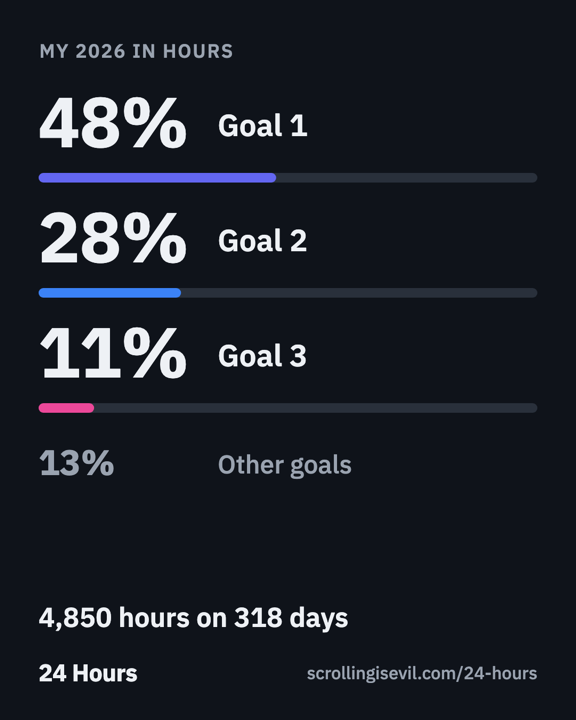
The year row is part of the free app on iPhone and Android. Your goals and history are stored on your phone. An optional one-time Supporter purchase adds unlimited goals.
Get 24 Hours on the App StoreGet 24 Hours on Google Play
To plan one week instead of a year, use Plan your 168 hours. Help for the app is on the 24 Hours support page.